Colours
Background ColourDisplays a dialogue enabling a wide variety of colours to be selected. After selection the change will be visible immediatly. Red / Green / Blue / ... Preset Image ColourA number of preset colours are available to select from. They have been preselected on the basis of best quality screen representation. (Some colours are not well suited to high speed animation and can cause image distortion). After selection the change will be visible instantly. NB: To add more colours copy c:\CS\vEMDR\Image\System\Black.gif to a different name and edit using any image editor. (Advanced users only). © Neuro Innovations 2002-2010
Home
|
Shop
|
Contact us
|
Therapists Toolkit
|
EMDR Software
|
EMDR Lite Software
|
Phobia Treatment Software
|
Aversion Software
|
TFT Software
|
Flooding Desensitisation / Implosion Therapy Software
|
Emetophobia Desensitization Multimedia Software
|
Desensitisation Therapy Multimedia
|
NLP Swish technique mood / state change software
|
Bilateral Audio Software
|
Drug / alcohol / food (cake / chocolate) aversion software
|
CBT / CBH Tasking Software
|
Directory / Resources |
Sitemap
EMDR, Hypnotherapy and Hypnosis in High Wycombe and Central London |
() |
Psychotherapy, hypnotherapy and hypnosis in High Wycombe
Last Updated 07 October 2026 © www.neuroinnovations.com 1998-2023
|
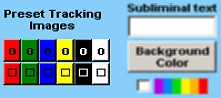 The mini menu to the right is present when in setup mode. The "Background Colour" button sets the backgound colour, the area to the left sets the preset image colour and shape.