Beeps / TapsAdd beep
If the shared resource folder is present the default path will be C:\CS\Shared\Audio\Beep. The following audio formats are supported WAV/MP3/MP2/MP1 By default the file display filter is set to WAV. To load a MP3/MP2/MP1 file alter the filter in the dialogue box to "All files *.*" If a file type is not supported or corrupt or missing a "Can't load sample" message will appear. Click on "OK" to continue. WARNING: Very large audio files will take time to load and may slow the system down. Clear Beep (v2.8+)Removes the currently loaded sound from memory completely. Beep volume track barIncreases or decreases the playback volume of the currently loaded beep sound. The initial setting of the track bar is 50% of maximum. The initial setting of playback is the current speaker volume as defined by current settings within Windows. Does not affect background sounds NB All beep sounds are automatically panned from left to right as per the position of the ball / (image). NB Large beep audio files should be avoided. UNSUPPORTED FEATURE: Background audio sounds may also be played as panned beeps. Results may however be unpredictable because sounds will tend to overlap. Tapper (Checkbox)
If the tactile unit controller is not connected the checkbox is greyed out. To enable the tactile units close EMDR Pro, plug-in the tactile unit controller (the black box) and restart EMDR Pro. Tap duration scrollbarThe amount of time that the left or right tappers should remain "on" when the tracking object or image is at the right or left hand sides. If the duration selected is greater than the amount of time it takes for the tracking image / object to move from left to right, the duration is automatically cut-short to enable smooth pulsing. "L" / "All off" / "R" - Manual testing buttonsFor purposes of testing duration settings and to verify that the tappers are in the correct hands. Gentle (Checkbox)When checked forces the tappers to pulse more gently. The strength of the pulse of tactile sensations can also be adjusted via an adjuster within the controller unit itself. (Set initially to 70% of maximum). © Neuro Innovations 2002-2010
Home
|
Shop
|
Contact us
|
Therapists Toolkit
|
EMDR Software
|
EMDR Lite Software
|
Phobia Treatment Software
|
Aversion Software
|
TFT Software
|
Flooding Desensitisation / Implosion Therapy Software
|
Emetophobia Desensitization Multimedia Software
|
Desensitisation Therapy Multimedia
|
NLP Swish technique mood / state change software
|
Bilateral Audio Software
|
Drug / alcohol / food (cake / chocolate) aversion software
|
CBT / CBH Tasking Software
|
Directory / Resources |
Sitemap
EMDR, Hypnotherapy and Hypnosis in High Wycombe and Central London |
() |
Psychotherapy, hypnotherapy and hypnosis in High Wycombe
Last Updated 07 October 2026 © www.neuroinnovations.com 1998-2023
|
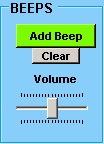 Enables you to add a beep sound from c:\CS\vEMDR\Audio\Beep (default path)
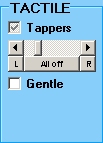 When checked activates the appropriate left or right tapper unit if connected.